Confidential · IYKYK
I stole my competitor's $1m/d framework and I want you to do the same.
The entire creative system. Every AI skill, every API, every prompt.
Who is this for? Supplement brands running direct response on Meta + YouTube.
I got tired of seeing the "STUDY WHAT RESILIA IS DOING" or whatever those annoying ass engagement farming posts are lol.
So instead of soy posting, here is the actual framework that can make you filthy fucking rich if done right.
Every section below has the literal prompt I give my agent, word for word. Copy it, paste it into your own Claude agent, change the brand name, go.
ENJOYYYYYY!!!!!
00The stack, and what it actually costs me
Before anything else, here is everything that touches an ad from research to delivery. No secret tools, you can have all of them today.
Cost: I'm running roughly $2,000 a day through generation on a heavy week. Veo is 22 credits for an 8 second take, a full 30 second ad with two variants per slot is about 170-215 credits. That adds up fast when you are producing dozens of variants, which is exactly why steps 08 and 15 exist.
01Give your agent your actual browser
This is the part everybody misses and it is the difference between "AI helped me brainstorm" and "AI ran my research department while I was asleep."
I do not download competitor ads myself. I do not paste screenshots. I do not export CSVs. I connect Claude to my real Chrome, the one that is already logged into everything, and then I tell it what to go do.
It opens the Ad Library. It scrolls. It reads the page. It pulls the videos. It builds the sheet. I go do something else.
Set that up first, or nothing below works.
You have control of my actual Chrome browser through the Chrome connector.
I am already logged into Meta Ads Library, Google Ads, Shopify and Google Drive.

Standing rules for this session:
- Use my browser directly. Do not ask me to paste screenshots, export CSVs
  or hand you data you can go get yourself.
- If a page needs scrolling to load more results, scroll it. If it needs a
  click, click it. Do not stop and ask me to do it.
- If something fails, tell me exactly what failed and what you tried. Do not
  silently work around it with a worse method.
- Save every artifact you produce to disk in the working folder so we can
  rebuild without re-scraping.

Confirm you can see my browser and list the tabs that are currently open.02Tear down the competitor library
The Ad Library only shows active ads. Every ad you can see is an ad somebody is still paying for, right now.
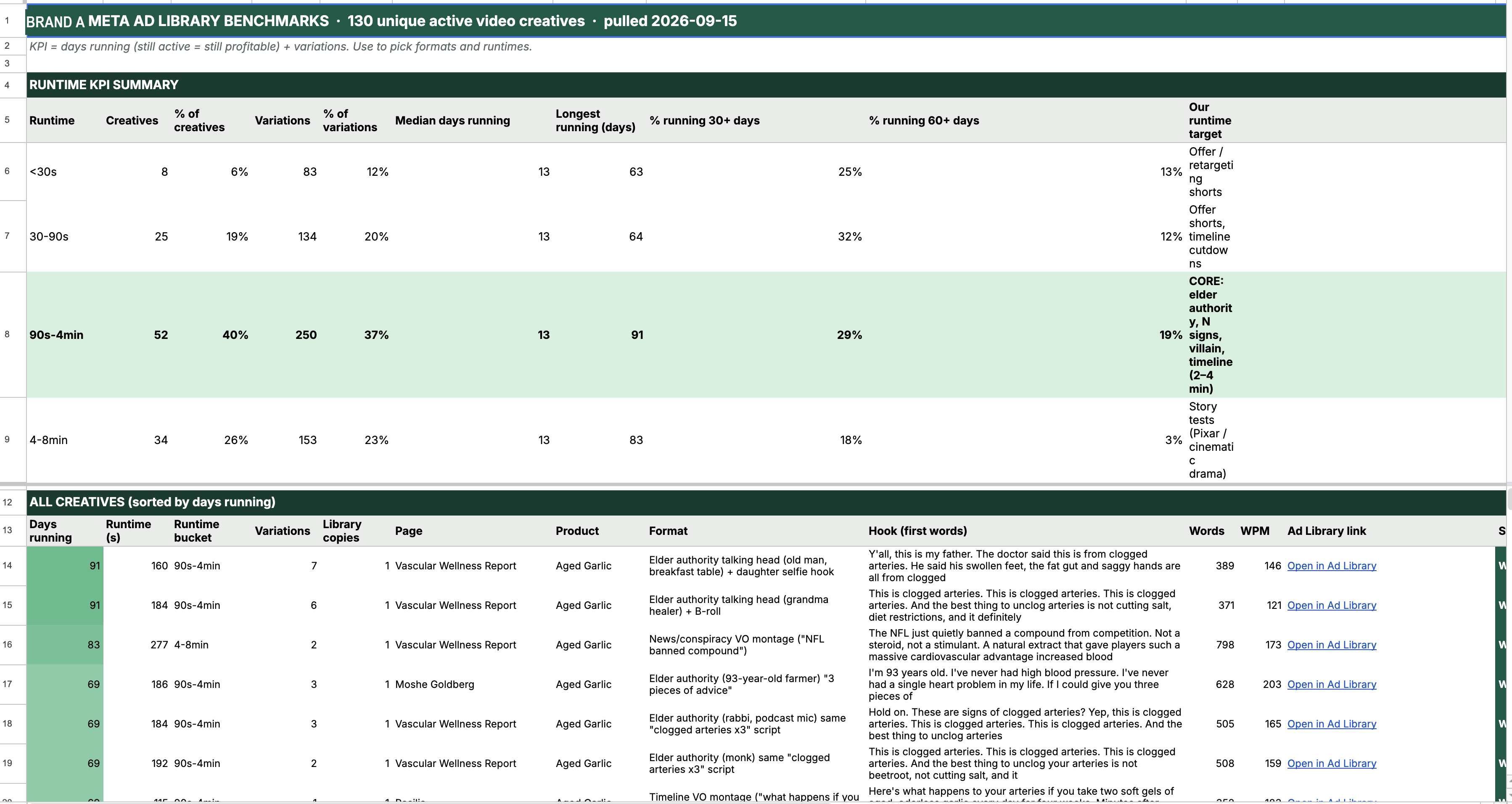
Which makes "days running" the only honest metric in advertising. Nobody keeps a loser live for 90 days out of sentiment. (unless zombie campaign but i'll explain that later...)
- 30+ days = Oh shit, may have a runner
- 60+ days = Chad ad 🗿
- 90+ days = Ultra Chad Ad, "Im making enough to buy a lambo every day"
Second signal is variations. When the library shows "N ads use this creative" that is somebody reskinning a winner. Nobody makes 40 versions of a loser.
Important and nobody says this: you are not analysing all 4,500 of their ads. You sort by impressions and you take the top of the list. A brand showing thousands of ads is running a couple hundred actual creatives and the rest are copies. The copies are data, but they are not new information.
Go to the Meta Ad Library in my browser and pull the active video ads for
[COMPETITOR PAGE NAME].

1. Sort by impressions, highest first. Scroll until you stop getting new
   results, at least 15-20 scrolls.
2. For every video ad, capture: the ad ID, the page, the product line,
   days running, the number of ads sharing that creative (variations),
   and the video source URL.
3. Download every unique video to ./library/. Pull the file server side
   from video.currentSrc, the in-page URLs are signed and masked.
4. Dedupe by md5. One creative = one hash. Sum duplicates into a
   "variations" count. Tell me how many unique creatives came out of how
   many listings.
5. For every unique creative, measure with ffmpeg and ffprobe:
   - runtime in seconds
   - hard cut count using: select='gt(scene,0.3)'
   - cuts per minute, average shot length, cuts in first 10 seconds
   Use scene threshold 0.3 and nothing else. We reuse it later to score
   our own ads and the comparison has to be apples to apples.
6. Transcribe the top 30 by days running with whisper.cpp. Only the top 30.
   Record word count and words per minute for each.
7. Build a 12 frame contact sheet per ad (tile=4x3) and actually look at
   each one before you tag it.
8. Tag every ad: format, character archetype, set, hook type, hook visual,
   mechanism, offer device, caption style, edit style.

Output a single JSON file with one record per unique creative.
Flag anything you could not measure rather than guessing.03Turn the teardown into the sheets
The JSON is useless sitting on disk. It becomes four tabs that I actually work out of every day, and the agent builds all of them.
This is the prompt that produced my entire creative tracker. Every tab, every band, every chart.
Using the teardown JSON, build me a Google Spreadsheet called
"[BRAND] CREATIVE TRACKER" with these tabs. Use the Drive connector to
create it, then Apps Script to format it, because the connector can create
files but cannot edit cells.

TAB 1 "BENCHMARKS"
One row per unique competitor creative, sorted by days running descending.
Columns: days running | runtime (s) | runtime bucket | variations |
library copies | page | product line | format | hook (first words) |
words | wpm | Ad Library link | status
Status vocabulary: WINNER 60+ / WORKING 30+ / TEST under 30.
Buckets: under 30s, 30-90s, 90s-4min, 4-8min, 8min+.

TAB 2 "DASHBOARD"
A runtime KPI table: for each bucket give creatives, % of creatives,
% of scaled variations, % running 30+ days, % running 60+ days, longest
running, and count of 60+ day winners.
Then a table "formats of the 60+ day winners" counting each format.
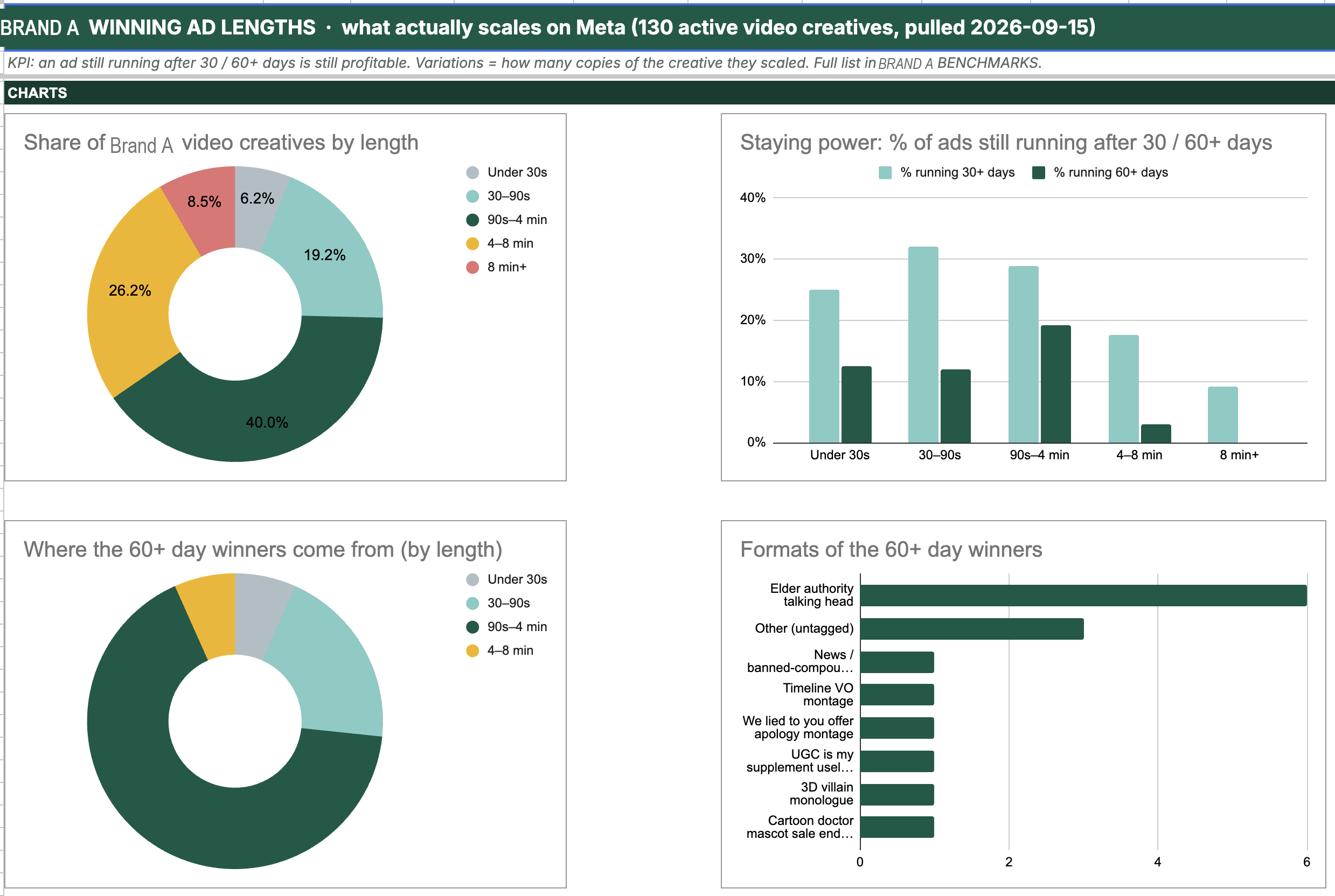
Then four charts: share of creatives by length, % still running at 30/60
days by bucket, where the 60+ winners come from, formats of the winners.
Put a 4 tile KPI strip at the top with the winning bucket, its share, the
longest running ad, and the survival gap between the best and worst bucket.

TAB 3 "VISUAL + CONCEPTS"
Same creatives, different columns, read from the contact sheets:
library ID | link | page | product line | days running | variations |
runtime | hard cuts | avg shot (s) | cuts per min | edit style | concept |
avatar + set | hook visual | caption style | opening line
Edit style buckets: static anchor (3 cuts or fewer), light cutting
(12 or fewer per min), montage (over 12 per min).
Then a KEY FINDINGS block at the top, numbered, each one a sentence I could
act on, each one backed by a number from this tab.
Then an EDIT STYLE vs LONGEVITY table, and a per product line table
comparing their mature line against the line that competes with me.

TAB 4 "CREATIVES"
My production queue. Colored bands by angle type in this order:
ROOT CAUSE, STRONG CALL OUT, TOPIC, COMPARISON, OFFER, SOCIAL PROOF,
MYTH BUST. Repeat the header row under each band.
Columns: Ad ID | Angle Type | Angle/Title | Hook (first 3 seconds) |
Format | Target runtime (KPI) | Script + Copy (Doc link) |
Video File (Drive link) | Status | Destination | Notes
Status dropdown: SCRIPTED, IN PRODUCTION, READY, TESTING, WINNER, KILLED.
Target runtime values must come from the DASHBOARD buckets, never invented.

Make a hidden BACKUP tab before any future reorganisation.
That one prompt is the difference between "I looked at some competitor ads" and having a queryable dataset you build every future decision on.
04Let the sheet pick your format
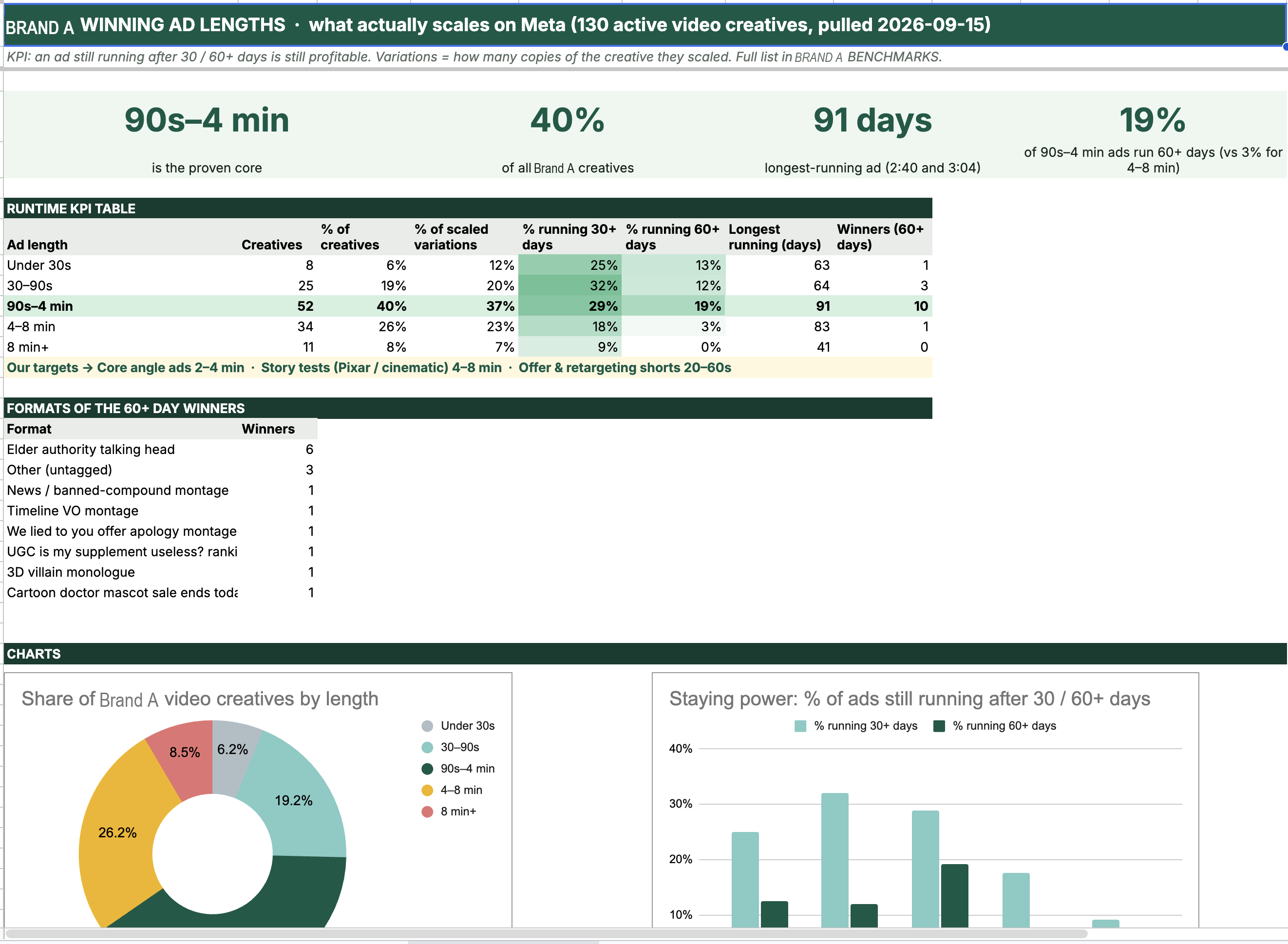
Here is what my dashboard said off 130 measured creatives:
| Runtime | Creatives | Share | Hit 60+ days |
|---|---|---|---|
| Under 30s | 8 | 6% | 13% |
| 30–90s | 25 | 19% | 12% |
| 90s–4 min | 52 | 40% | 19% |
| 4–8 min | 34 | 26% | 3% |
| 8 min+ | 11 | 8% | 0% |
90 seconds to 4 minutes is where the money lives. Both ends of that band fall off a cliff.
Now the one that will make you angry, because it made me angry.
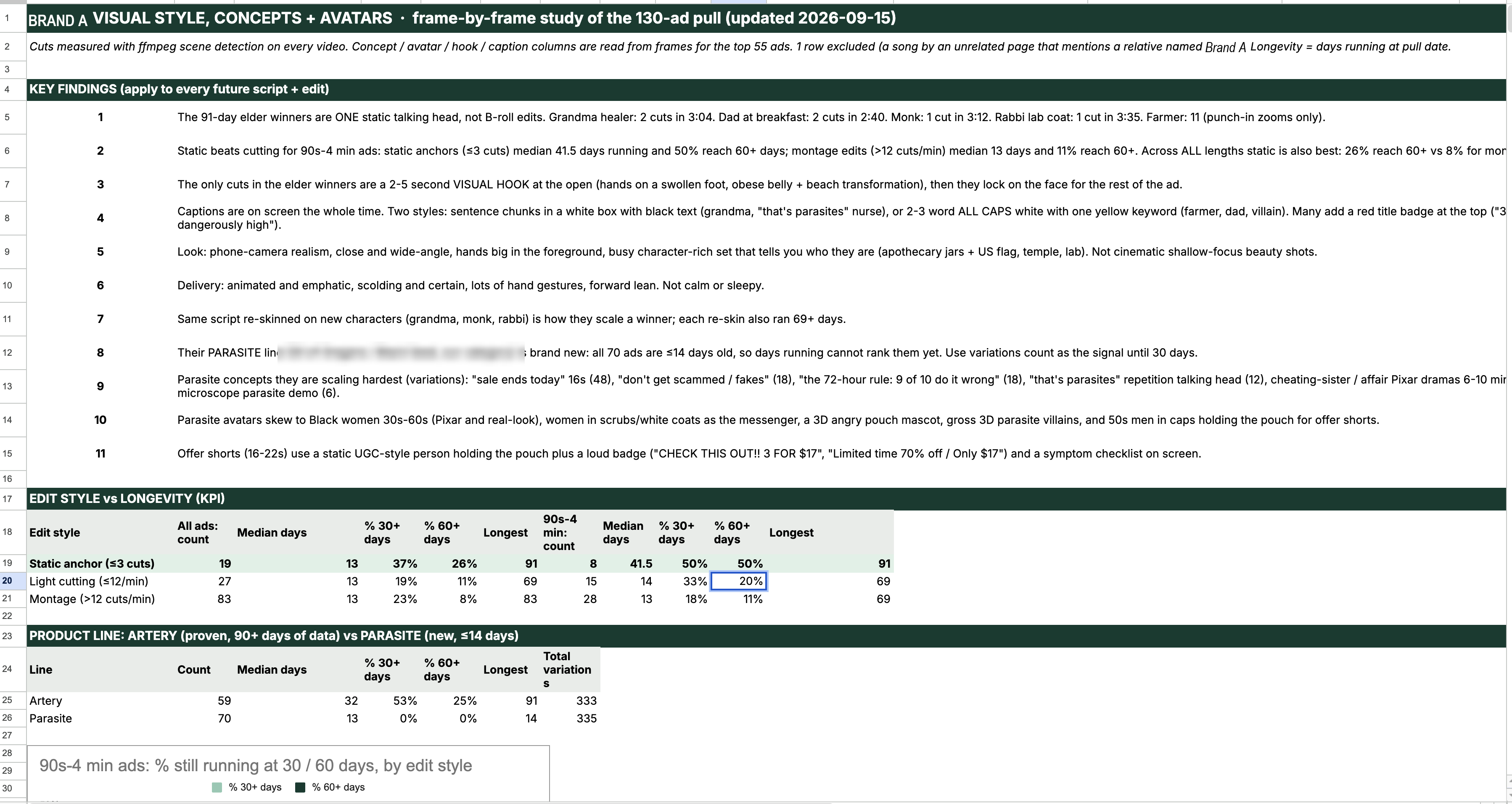
Everybody "knows" you have to cut fast. Montage, b-roll every 2 seconds, keep the dopamine going. It is the most repeated advice in performance creative. So I had the agent measure edit density against days running:
| Edit style (90s–4min) | Ads | Median days | Hit 60+ |
|---|---|---|---|
| Static anchor (3 cuts or less) | 8 | 41.5 | 50% |
| Light cutting | 15 | 14 | 20% |
| Montage (12+ cuts/min) | 28 | 13 | 11% |
Static talking heads survive at 50%. Montage survives at 11%.
The 91 day winners: a grandma with 2 cuts in 3 minutes 4 seconds. A dad at a breakfast table, 2 cuts in 2:40. A monk, ONE cut in 3:12. A farmer with zero cutaways who just punches in slightly on the important lines.
4.5x the survival rate for doing LESS work. Everyone is editing like it is a TikTok and the winners are just sitting there talking to you.
Also worth knowing: not every winner is a song ad. The formats that survive 60+ days in my data are elder authority talking heads (six of them), then one each of news montage, timeline VO, offer apology, UGC ranking list, 3D villain monologue, and cartoon mascot. Song ads are one style inside that mix, not the whole game. Study all of them.
05Copy the hook structure verbatim. All four parts.
One brand I tore down runs roughly 4,500 ads and here is the thing that should genuinely bother you: their copy is byte identical across all of them. Same primary text, same headline, same description, same URL. They do not test copy. One headline carries four and a half thousand ads while you sit there A/B testing punctuation like it is 2016 lol.
Their hooks though. I transcribed the top ones and the same four part skeleton came back every time:
"His new baby mama walks in at daycare drop off, snatched waist to 24, and I still hadn't lost the baby weight four years later. And the only reason I held my head up was what my hairstylist gave me the week before. So let me take it back to the start."
Part 1. Humiliated in public by somebody who loved them. The baby daddy. The best friend who sat on your couch every Sunday. The husband of 19 years. Always somebody close, and always with other people watching. A stranger being rude is annoying, somebody who loved you picking somebody else is a wound, and wounds hold attention.
Part 2. One detail too specific to be fake. "Snatched waist to 24." "Four years later." "Nineteen years." "I gained weight" is a claim. "Waist to 24" is a photograph.
Part 3. The save, withheld, from the wrong person. "the only reason I held my head up was what my hairstylist gave me." A hairstylist, of all people. You cannot guess what it was so you have to stay. This is the part most people drop when they rip these off and it is the part carrying the whole hook.
Part 4. The rewind. "So let me take it back to the start." One line, buys them the next four minutes.
The product is in none of the four. It shows up at the midpoint of the runtime, as the answer to the question the hook opened. I had the agent timestamp it across four of their ads: 2:27 of 4:54, 2:32 of 4:53, 2:58 of 6:48, 2:28 of 5:18. That is 50% every time, so on a two minute ad you are holding the product until the one minute mark.
Copy all four parts. Change the humiliation, the detail, the wrong person and the wound to fit your category. Keep the machine.
06Write the script against the beat map
Beats as percentage of runtime, not timestamps, so the same structure works at 90 seconds or 6 minutes.
Write a [RUNTIME] direct response video script for [PRODUCT], format
[FORMAT from the dashboard], angle [ANGLE].

Pull the format, runtime and word count target from the DASHBOARD tab.
Do not invent a runtime.

Brief it first, in this order, and show me this before the script:
avatar / enemy list / hidden cause / mechanism line / messenger /
proof timeline / vindication / objection / offer / closing line.

Then write the narration against this beat map, as % of runtime:
  0-3%    Hook. Twist, repetition, or a shocking specific.
  3-15%   Symptom mirror in the avatar's own words
  15-30%  Wound + enemy list + "it is not your fault, it is not your age"
  30-45%  Messenger arrives, hidden cause revealed
  45-55%  Mechanism, and the product physically enters for the first time
  55-60%  Objection, then permission
  60-85%  Proof timeline, a felt change at every step
  85-92%  Vindication, callback to the hook
  92-100% Offer, guarantee, CTA, closing line

The hook must contain all four parts:
  1. public humiliation by someone intimate, witnessed by others
  2. one absurdly specific detail (a number, an age, a duration)
  3. the withheld save from a mismatched source (not a doctor)
  4. the rewind line that buys the runtime

The product name appears NOWHERE before the 45% mark.

Writing rules:
- 4 to 10 word sentences. Fragments are fine. Contractions always.
- One concrete noun or number per sentence where you can.
- Repeat the hook line and the mechanism line 3x across the ad.
- Blame external enemies, never the viewer.
- Name the viewer's private behaviours (oversized shirts, no photos,
  on the couch by seven).
- Put the joke immediately before the objection or the ask.
- Hard ingredient names get written on the label, never spoken.
- No em dashes. No AI words: journey, unlock, game changer, elevate,
  delve, landscape, testament.

Deliver:
1. The narration, with % markers in the margin
2. A shot list, one shot per sentence
3. The Meta primary text, written CALM. All the drama stays in the video.
   Headline under 40 characters.
4. A variation plan: 5 alternate hooks and 3 alternate characters or
settings for this same body script. Write these now, not later.07Split into takes before you spend a credit
Veo stretches your narration to fill whatever duration you ask for. Ask for 8 seconds, hand it 14 words, and it drawls at you. Your ad feels slow and you cannot work out why.
Pace is controlled by duration and only by duration. I wrote "130 words per minute" into a voice prompt once and it made things actively worse lol.
Split this script into generation takes. Rules:

- Split at sentence boundaries first, then commas if a sentence is too long.
- Maximum 24 words per take. Never break mid clause.
- Assign duration by word count:
    4 seconds  if 11 words or fewer
    6 seconds  if 12 to 18 words
    8 seconds  if 19 to 24 words
- 8 seconds is a hard cap. If a sentence will not fit, split it.

Then print:
- the take list with word count and assigned duration
- total runtime
- estimated words per minute (target 170)
- estimated credit cost, using 4s=11, 6s=16.5, 8s=22, and DOUBLE it
  because we generate two variants of every take

Show me the cost before you generate anything.
My finished ads land in a 149 to 167 wpm band every time, because the split is arithmetic instead of a judgement call.
08Lock the character and the voice once
Make the character as a still image first. Stills are about 2 credits, video is 22. So all your rerolling happens at the cheap tier and you approve exactly one image.
That approved still becomes the start image on every anchor take. Generate a character from a text description twice and you get two different people, and your ad falls apart at the first cut.
Same with the voice. Write the block once, paste it byte identical into every take, never paraphrased or tightened. One word of drift and your character changes halfway through.
Step 1, the still. Generate the character with Nano Banana Pro at 2k,
in the aspect ratio of the final ad. Cheap, so reroll as many times as
you want. Give me 4 options.

Character: [AGE, REGION, BUILD, WARDROBE, SETTING, PROP, EXPRESSION]
Style: photoreal, natural available light, flat ungraded phone camera
color, no cinematic grade, no ring light. She/he does not look at camera.

Once I approve one, save its job ID as THE character reference and use it
as start_image on every single anchor take from now on. Never regenerate
the character from text again, in this ad or any future variation.

Step 2, the voice block. Write ONE block covering:
age, region, timbre, volume, vowel shape, inflection direction, attitude,
and pace in words per minute (use 170).
Then append this delivery note verbatim:
"every word is pronounced as one ordinary spoken word, do not spell any
word out, do not break any word into separate syllables, do not
over-enunciate."

Save the voice block to voice.txt. Paste it byte identical into every
take prompt. Do not rewrite, tighten or improve it between takes.
Before generating, md5 the voice block in every prompt and confirm they
all match.09Generate
Every prompt is five blocks in the same order, every time. The order matters, the model weights the front of the prompt harder.
Generate this take on Higgsfield with:
  model veo3_1, variant veo-3-1-fast, quality basic
  duration [4 / 6 / 8], aspect [9:16 or 16:9]
  start_image = [the locked character still, or previous take's last frame]
  count 2   <-- always two variants
  declined_preset_id = [the preset id]  <-- or the tool returns a preset
                                            recommendation instead of a job

PROMPT BODY, in this order:

No subtitles. No captions. No music.

SHOT - [SHOT DESCRIPTION]. Static camera, identical framing to the
provided image for the entire clip, no camera movement. Generic unbranded
props, no brand names or logos on any objects.

VOICE - IDENTICAL IN EVERY SHOT, DO NOT VARY: [paste voice.txt verbatim]

Says, word for word, and must say the complete sentence all the way
through to the final words: "[LINE]"

SOUND: voice only, recorded in a quiet room. Absolutely no music, no
score, no instrumentation of any kind at any point in the clip. No sound
effects, no animals, no clock, no birds, no wind. Nothing but the voice.
Generate the audio bone dry on purpose. Every clip invents its own ambience otherwise, and the mismatch at every cut is exactly what makes a stitched AI ad sound broken. Room tone goes on once, later, across the whole thing.
Always two variants. About one in six comes back with a word changed or dropped. On one four take ad, three of the four first passes were unusable. Two variants costs the same as finding out later and redoing it.
Things it will do to you, all now permanently in my template:
| What happens | Fix |
|---|---|
| ALL CAPS gets spelled out letter by letter. "FAMILY" came back "F-A-mily" | Normal case. Emphasis goes in a delivery note. |
| Eats your first word | Put a throwaway word in front, let it get eaten |
| Drops trailing words on tight durations | Bump the take up a duration tier |
| Will not render your product. Ever. Tried it four times. | Composite the real packaging in post |
| Invents props branded with YOUR brand name | "generic unbranded props, no brand names on any objects" |
| Some phrases return a preset instead of a job | Pass the declined preset id and resubmit |
If you are making a song ad
The sheet picks this format some weeks and skips it others. When it picks it, the lyrics carry the whole sales argument, so every word has to be audible.
I tried ElevenLabs Music for this and it mangles lyrics at speed. Wrote "a Ziploc bag my aunt mailed to the island" and it sang "a zip lock back my own eighth and bail to cut." The chorus dropped the character name entirely, four generations in a row.
Suno is the one that sings words you can understand. ElevenLabs stays in the stack for voiceover and voice cloning, which it is genuinely excellent at.
Write a [GENRE] story song for a [RUNTIME] ad. The whole ad is sung,
there is no spoken narration. The verses carry the plot, the chorus is
the sales argument.

Structure it to the same beat map as a spoken script. Product name does
not appear until the 50% mark, which lands at the bridge.

Pacing rule that matters more than anything else:
give every line about 5.5 seconds. Four lines per verse in a 22 second
section. Cram 8 lines into 20 seconds and the vocal turns to mush.

Protect any name in the chorus with a hard consonant in front of it.
"about Earl" renders as "about her". "his name is Earl" survives.

Deliver three blocks I can paste straight into Suno:
1. STYLE OF MUSIC box: genre, bpm, vocal description, instrumentation,
   and the words "clear enunciated storytelling, vocal front and centre"
2. EXCLUDE STYLES box: mumbled vocals, slurred words, heavy reverb,
   vocal buried in the mix
3. LYRICS with [Verse] [Chorus] [Bridge] tags

Then: generate the chorus on its own first, 30 seconds. If the hook does
not stick, nothing after it matters and you have wasted nothing.

After I bring back a track, transcribe it with whisper before we build
anything against it. If the words are not legible in the transcript they
are not legible in the ad.10Frame chaining. This is the whole secret to multi shot AI video.
Generate four takes from one shared still and you get four takes that each reinvent the room. The cut is visible every time and the ad looks like garbage.
Instead, every take starts on the previous take's final frame. The model is then continuing an image instead of imagining one, so the lighting, the pose, the props and the whole set carry across the cut.
This is the single technique that makes the difference between "AI slop" and something that looks like it was shot.
From now on, for any multi take ad, chain the frames. Never generate all
takes from one shared still.

Procedure:
1. Take 1 uses the approved character still as start_image.
2. After each take is approved, extract its LAST frame:
     ffmpeg -y -v error -sseof -0.25 -i take.mp4 -update 1 -q:v 2 last.jpg
   -sseof seeks from the END of the file. -update 1 keeps overwriting so
   the final frame written is the one left on disk.
3. That frame becomes start_image for the next take.
4. Before chaining from any frame, check it is not a fade to black:
     mean luma < 12 of 255 = do not chain, regenerate that take instead
5. Repeat to the end of the ad.

Constraints you must plan around:
- Chained takes CANNOT be batched. This is strictly serial. Tell me the
  expected wall clock before starting.
- If a take fails QA, everything after it has to be regenerated too,
  because the chain is broken. Approve each take before continuing.

Exception: if a take deliberately ends on a white out or a flash, that is
fine and actually useful. Check the luma, and if it is very high, tell me,
because we can hide the next cut inside it.11Verify every take before it touches the edit
Do not watch them. Have the agent measure them. A take that sounds fine to you will clip in the render and you will not know why.
For every generated take, run both checks and give me one table.

1. Transcribe it:
   ffmpeg -i take.mp4 -ar 16000 -ac 1 t.wav
   whisper-cli -m ggml-base.en.bin -f t.wav -nt -np

2. Contact sheet it:
   ffmpeg -i take.mp4 -vf "fps=1/3,scale=180:-1,tile=5x2" -frames:v 1 sheet.jpg

Then report per take:
- match ratio of the transcript against the scripted line (difflib)
- measured words per minute of the actual speech
- the timestamp the speech ENDS vs the clip duration
- whether the character looks on-model in the contact sheet

FAIL any take where:
- a word from the script is missing
- speech ends within 0.15s of the clip end (it will clip in the render)
- measured wpm is under 140 (padded, it will feel slow)
- the character design drifted

For failures, tell me which of the two variants to use, or say both are
dead and it needs a reroll. Mishearing a proper noun is fine, captions
come from the script not from whisper.12Assemble, caption, mix
You never touch ffmpeg. The agent does. But these parameters are the difference between an ad that feels like one recording and an ad that sounds like four clips taped together, so they are worth handing over explicitly.
Assemble the approved takes into the final master.

STEP 1, NORMALISE EVERYTHING FIRST. Takes come back with different sample
aspect ratios, frame rates and loudness. xfade refuses to join mismatched
streams and mismatched loudness is audible at every cut.
  -vf "scale=[W]:[H]:force_original_aspect_ratio=increase,crop=[W]:[H],
       fps=24,setsar=1,format=yuv420p"
  -af "afade=t=in:st=0:d=0.03,afade=t=out:st=[end-0.03]:d=0.03,
       aresample=48000"
Those 0.03s fades kill the clicks at the joins.

STEP 2, CUT ON WORDS NOT TIMECODES. For each take, align the whisper
transcript to the script with difflib, then trim 60ms before the first
word and 220ms after the last, snapped to 24fps frame boundaries.
Specify any b-roll as "cut to this clip on word N", never as a timestamp.
When the voice moves, the edit moves with it.

STEP 3, JOIN. Compute crossfade offsets from PROBED durations, never
assumed. 0.10s dissolve for frame chained takes, 0.18s for unchained.
acrossfade on audio with c1=tri:c2=tri.

STEP 4, CAPTIONS, burned in off word level whisper timings.
- 1 to 3 words per card, bold white, black outline 3-4px
- ONE keyword per card in yellow (#FFE600)
- flush the card at 3 words, or a gap over 0.35s, or sentence punctuation
- keep captions off faces and off the product
- captions come from the SCRIPT, not the transcript

STEP 5, SOUND. One music bed across the WHOLE ad, never per take. This is
the single thing that stops stitched clips sounding stitched.
  [voice]asplit=2[vox][key];
  [bed][key]sidechaincompress=threshold=0.04:ratio=9:attack=15:release=350[duck];
  [vox][duck]amix=inputs=2:normalize=0[mix];
  [mix]loudnorm=I=-14:TP=-1.5:LRA=11[out]
Bed sits 18-24 dB under the voice, ducked by the voice itself. Room tone
under everything at -45 to -55 dBFS.

STEP 6, EXPORT. H.264 High, 24fps, CRF 19, yuv420p, AAC 192k at 48kHz,
+faststart. Name it [BRAND]-[PRODUCT]-AD[nn]-[slug]-[aspect]-v[n].mp4

STEP 7, QA THE MASTER before you hand it to me:
- hook line and hook visual land in the first 2 seconds
- no black or blank first frame
- cut density matches the format (talking head = 3 hard cuts max)
- no narration gap over 0.4s, no pops at the seams
- one voice timbre the whole way through
- captions synced within 100ms
- product label correct and not mirrored
- offer card on screen at least 3 seconds
- measure integrated loudness and confirm it is within 1 LU of -1413Score your ad against the ads you copied
This is the part almost nobody does and it is why most people never get better. You are not grading your ad against your own taste, you are dropping it into the competitor's leaderboard and seeing where it lands.
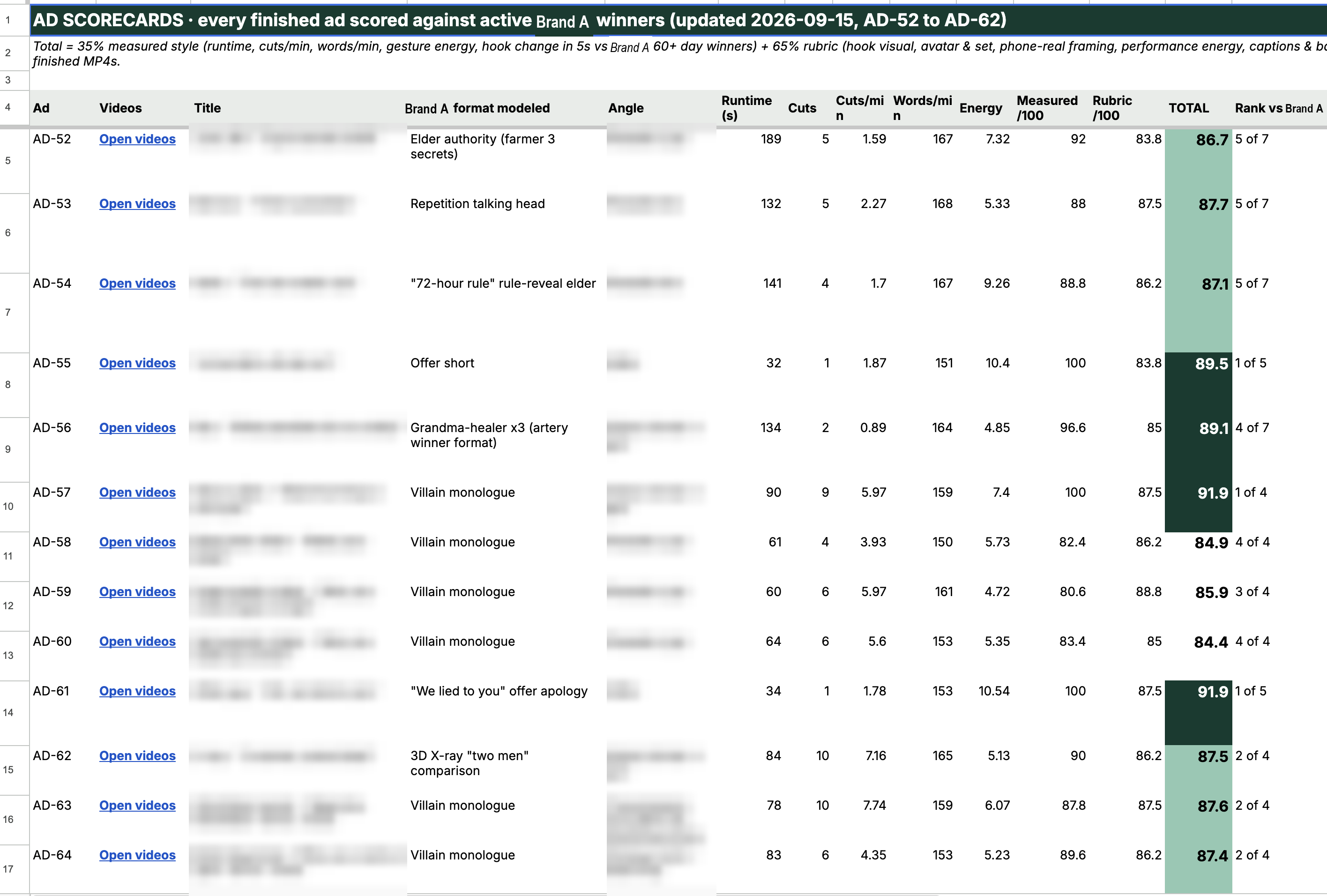
35% measured, 65% human rubric. The measured part is automatic. The rubric part you judge with your frames sitting right next to theirs.
Build me an AD SCORECARDS tab in the creative tracker, and score this ad.

MEASURED (35% of total), all automated:
- runtime, and which dashboard bucket it lands in
- cuts per minute, using the SAME scene threshold 0.3 we used on them
- words per minute from the whisper transcript
- motion energy: median signalstats YAVG on a tblend=difference at fps=4,
  scaled to 90x160, dropping hard cuts
- hook visual change: is there a cut or a major frame change before 5.5s
Score each against the band the 60+ day winners occupy in the BENCHMARKS
tab. Do not use fixed bands, derive them from the winners.

RUBRIC (65% of total), 0-10 each, judged from frames placed side by side
with the real competitor ads:
hook visual / avatar and set / phone real framing / performance energy /
captions and badge / script structure / offer clarity / AI realism

Then score 3 to 5 NAMED competitor ads on the exact same rubric, and
output a leaderboard with ours inserted into it. Include their days
running and their variation count next to each.

Columns: Ad | Title | Competitor format modeled | Runtime | Cuts |
Cuts/min | WPM | Energy | Measured /100 | Rubric /100 | TOTAL |
Rank vs competitors | Library percentile | Weakest scenes (reroll first)

The weakest scenes column is the actual output. Name the specific takes
and why: "take 7, 186 wpm, too fast" / "take 10, energy 5.76, slow".

If our ad loses, say it loses. A scorecard that always flatters us is
worthless.
Real output from mine, so you know what you are aiming at:
AD-57 · 90s · 5.97 cuts/min · 159 wpm · measured 100 · rubric 87.5 · TOTAL 91.9 · rank 1 of 4 · library percentile 100
Weakest scenes: take 7 (186 wpm) · take 10 (131 wpm, slow) · take 5 (169 wpm)
And one that lost, because those matter more:
AD-66 · TOTAL 84.6 · rank 4 of 4 · library percentile 53 · weakest take flagged "173 wpm, energy 1.6, low energy"
The output is a work order. It names the exact takes to regenerate.
14The page the ad points at has to exist first
No ad gets scripted until its destination is built, live, and written into the URL map. The map is the only place a legal destination can come from, and the agent is not allowed to invent one.
This also keeps you out of trouble. Organic pages never link to an ad only page, and there is no referrer gating or click ID redirecting anywhere, because that is cloaking and it ends the ad account.
Build me a "[BRAND] URL MAP" sheet with these bands:

ALL URLS
Every surface with: URL (production), preview/editor URL, purpose,
status, owner, notes. Statuses: LIVE, DRAFT, ARCHIVED.

AD-ONLY URLS (ad -> presell -> PDP -> checkout)
One row per angle. Columns: offer | angle/slug | presell URL (the link in
the ad) | PDP destination (where the presell CTA goes) | status | format |
notes. The 1:1:1 rule, one angle maps to one presell maps to one PDP.

ADS READY URLS
The whitelist. Only these four-ish rows may ever be pasted into Ads
Manager. Columns: destination | format/angle | website URL |
URL parameters | status | where it goes | best for.
Put the literal UTM string in the cell, ready to copy:
utm_source=facebook&utm_medium=paid_social&utm_campaign={{campaign.name}}
&utm_term={{adset.name}}&utm_content={{ad.name}}&utm_id={{campaign.id}}

STORE WIRING
Product IDs, variant IDs, selling plan IDs, one-time vs subscription
prices, first order vs refill price, and which template each uses.

ASSETS
Every image with where it is used and any per-image prohibition.

RULES
The hard rules, written as rules not suggestions.

OPEN ITEMS
Owner assigned, with status. Owner is me or you.

CHANGELOG
Date, surface, change. Append to this every time you touch anything.

ENFORCE THIS: when I ask you to script an ad, check the destination
exists in ADS READY URLS with status LIVE first. If it does not, stop and
tell me, do not script the ad.15Track it, launch it, then print variations
The tracker is an index, not a document. Each row is thin, and the weight lives in a Doc and a Drive folder that the row links out to.
SCRIPTED -> IN PRODUCTION -> READY -> TESTING -> WINNER / KILLEDJudged on the same KPI you used to pick the format back in step 04. Still profitable at 7, 14, 30 days.
Then the part that actually makes this scale.
File this finished ad:
1. Add a row to the CREATIVES tab under its angle band.
2. Create a Google Doc named "AD-[nn] · [title]" containing: a back link
   to the tracker, the info table (angle, format, runtime, hook, status,
   destination, UTM), the full script as a table (time | scene |
   voiceover + captions | cutaway), the AI generation prompts used, the
   Meta copy, and a pre-launch checklist.
3. Create a Drive folder for the video files and link it in the row.
4. Log runtime and credits spent. Set status READY.

NOW THE VARIATIONS. A variation is NOT a new ad.

An ad is a folder of takes where take 1 is the hook. To make a hook
variant:
  - hardlink every take except T01 from the base ad (os.link, zero bytes,
    not a copy)
  - generate ONE new T01
  - swap takes[0]['text'] in the config
  - leave takes 2 onward byte identical
Only the first 8 seconds are ever regenerated.

For the 16:9 version, do NOT re-render. Composite the existing vertical
take onto an outpainted plate with a feathered alpha mask, then rewrite
the config canvas and caption position.

At 30 days profitable, mark the ad WINNER and spawn 3 to 5 variation rows
using the alternate hooks already written in the script's variation plan.

Report how many delivered files came out of how many generated takes.
That is how 24 base ads turn into 87 folders and 173 delivered files without the credit spend tripling. The brand running 4,500 ads is doing exactly this. They are not testing 4,500 ideas, they are printing reskins of the handful that already won.
16Then run the whole thing on a schedule, forever
This is not a project you do once. The library changes every week, their losers die, their winners climb, and your format table should move with it.
So it runs on a cron and I read the diff over coffee.
Set this up as a scheduled task, daily.

Every morning:
1. Re-pull the active library for each competitor in my watch list.
2. Diff against yesterday's pull and report ONLY the changes:
   - new creatives that appeared
   - creatives that died, and how many days they made it
   - creatives that crossed 30 or 60 or 90 days since yesterday
   - any creative whose variation count jumped, that is them scaling it
3. Re-measure anything new: runtime, cuts, cuts per minute, wpm.
4. Append new rows to BENCHMARKS, update the DASHBOARD tables, and if a
   runtime bucket or edit style changed rank, say so loudly at the top.
5. Update the CHANGELOG.

Then give me a five line summary, nothing longer:
- what they launched
- what they killed
- what they are scaling right now
- whether our house format defaults should change
- anything that beat our current best scorecard total

Do not re-transcribe ads we already have. Only transcribe new entrants in
the top 30 by days running.
The ads that survived move up. The ads that died fall off. Your defaults from step 04 change on their own.
The answer sheet updates itself, for free, every single day, whether you are paying attention or not.
Go abuse it 🗿
17Appendix. The values that will waste your week.
Everything above is the method. This is the stuff you only learn by paying for it. I am handing it over so you do not have to.
The magic value nobody tells you
Higgsfield intercepts certain prompts and returns a preset recommendation instead of an actual job. Words like "at night", "three in the morning" or "music" trigger it. Your generation silently does not happen and you sit there wondering why.
The fix is to resubmit the identical request with the preset explicitly declined:
declined_preset_id: "24bae836-2c4a-48e0-89b6-49fcc0b21612"   # IN THE DARK
declined_preset_id: "f1821f84-945b-4cd1-9085-1f479db0028e"   # DROWN IN MUSIC
Put it in every request by default. It costs nothing when it is not needed.
Everything else that bit me
| What happens | What to do |
|---|---|
| More than ~10 concurrent jobs | 429 rate_limit_reached. Submit in batches of 10 and wait. |
| Spelling an ingredient phonetically ("EYE-ver-MEK-tin") gets the job rejected as NSFW, while the plain word generates fine | Never spell ingredient names out. Write them on the label. |
| Random NSFW false positives on a specific character, repeatable on retry | Retry with a short neutral prompt on the preview variant. If it still blocks, rewrite the line. |
| It swallows a leading "And" | Add "starting with the word And" to the prompt, or use a throwaway lead word. |
| Product replacement passes trim the clip slightly (6.0s comes back 5.71s) | Verify the audio still carries the whole line after the swap. |
| Transport timeout on submit | The outcome is UNKNOWN. Do not auto-resubmit. Reuse the returned job id or you pay twice. |
| Homebrew ffmpeg ships without libass and without drawtext, so burned-in captions just fail | Render caption cards as transparent PNGs with Pillow, concat to a qtrle alpha video, overlay it. Pillow needs a venv, system Python is externally managed. |
ffmpeg 9 removed -vsync | Use -fps_mode cfr -r 30. -r conflicts with non-CFR. |
| Word-level whisper splits subwords: "I 'M", "WORM ED", "BELLY 'S" | Whisper prefixes every genuinely new word with a leading space. Merge any token that does not start with a space into the previous one. That one rule fixes all of it. |
| Converting 24fps takes to 30fps per segment drifted lip sync 0.49s by minute three | Keep everything at 24fps end to end and trim on frame boundaries. Print a drift check and make it equal zero. |
zsh eats bare shell variables in filter strings ($XF:c1 became 0.101) | Always brace them: ${XF}. |
| A music bed leaking into individual generated clips | Still unsolved. And do not try to detect it by measuring minimum RMS per second, dense speech never hits silence either so it flags your clean clips too. That approach fooled me for an hour. |
Verified costs
| Model | Config | Credits |
|---|---|---|
| Veo 3.1 fast, basic | 4s / 6s / 8s | 11 / 16.5 / 22 |
| Kling 3.0 std | 5s silent | 7.5 |
| Kling 3.0 std | 10s with sound | 20 |
| Nano Banana Pro | 2k still | ~2 |
| A full 30s ad | 2 variants per take | 170–215 |
Note the still is ~2 and the video is 22. That ratio is the whole reason you lock the character as an image before you generate a single frame of video.
18The Apps Script that formats the sheets
The Drive connector can create a spreadsheet but it cannot touch cells. So the agent creates the file, then writes and runs an Apps Script against it. That is the whole trick and it is why my sheets look like a product instead of a spreadsheet.
This is the formatting core, generic. Paste it into Apps Script, change the ID, run it.
function formatTracker() {
  var ss = SpreadsheetApp.openById('YOUR_SHEET_ID');
  var name = 'CREATIVES';

  // delete and rebuild so the script is idempotent. run it as often as you like.
  var old = ss.getSheetByName(name); if (old) ss.deleteSheet(old);
  var sh = ss.insertSheet(name, ss.getSheets().length);

  var G = '#0c3b2f',   // band green
      H = '#e8ece9',   // header grey
      W = '#ffffff';

  // this one line is why it stops looking like a spreadsheet
  sh.setHiddenGridlines(true);
  sh.getRange('A:K').setFontFamily('Inter').setFontSize(10)
    .setVerticalAlignment('middle');

  var r = 1;

  // a full width dark band, used to open every section
  function band(text) {
    sh.getRange(r,1,1,11).merge().setValue(text)
      .setBackground(G).setFontColor(W).setFontWeight('bold').setFontSize(11);
    sh.setRowHeight(r, 26); r++;
  }

  // the light header row that repeats under every band
  function header(vals) {
    sh.getRange(r,1,1,vals.length).setValues([vals])
      .setBackground(H).setFontWeight('bold').setWrap(true);
    r++;
  }

  // title
  sh.getRange(r,1,1,11).merge()
    .setValue('[BRAND] CREATIVE TRACKER  ·  every ad, by angle')
    .setBackground(G).setFontColor(W).setFontWeight('bold').setFontSize(14);
  sh.setRowHeight(r,34); r += 2;

  var COLS = ['Ad ID','Angle Type','Angle / Title','Hook (first 3 seconds)',
              'Format','Target runtime (KPI)','Script + Copy','Video File',
              'Status','Destination','Notes'];

  // one band per angle type, header repeated under each
  var BANDS = [
    ['ROOT CAUSE: explains WHY people feel this way (the hidden reason)', ROOT_ROWS],
    ['STRONG CALL OUT: pattern-interrupt hooks that name a frustration', CALLOUT_ROWS],
    ['TOPIC: educational angle on one mechanism', TOPIC_ROWS],
    ['COMPARISON: us vs the alternatives', COMPARISON_ROWS],
    ['OFFER: price, guarantee, urgency', OFFER_ROWS],
    ['SOCIAL PROOF: reviews, UGC, testimonials', PROOF_ROWS],
    ['MYTH BUST: knocks down a common belief', MYTH_ROWS]
  ];

  BANDS.forEach(function(b) {
    band(b[0]);
    header(COLS);
    if (b[1].length) {
      sh.getRange(r,1,b[1].length,COLS.length).setValues(b[1]);
      r += b[1].length;
    }
    r++;  // breathing room between bands
  });

  // status colors, case sensitive so WINNER never matches "winner-ish" text
  var statusCol = sh.getRange(2, 9, r, 1);
  var rules = [
    ['WINNER',        '#b7e1cd'],
    ['TESTING',       '#fce8b2'],
    ['READY',         '#c9daf8'],
    ['IN PRODUCTION', '#efefef'],
    ['KILLED',        '#f4c7c3']
  ].map(function(p) {
    return SpreadsheetApp.newConditionalFormatRule()
      .whenFormulaSatisfied('=EXACT($I2,"' + p[0] + '")')
      .setBackground(p[1]).setRanges([statusCol]).build();
  });
  sh.setConditionalFormatRules(rules);

  // a real dropdown, so nobody types "in prod" and breaks your filters
  statusCol.setDataValidation(
    SpreadsheetApp.newDataValidation().requireValueInList(
      ['SCRIPTED','IN PRODUCTION','READY','TESTING','WINNER','KILLED'], true
    ).build()
  );

  sh.setColumnWidth(1,70); sh.setColumnWidth(3,220); sh.setColumnWidth(4,320);
  sh.setFrozenRows(2);
}
And the dashboard charts, same pattern. Build the table first, then point a chart at the range you just wrote:
// tblStart is the row where your header sits, then 3 data rows under it
var chart = sh.newChart()
  .setChartType(Charts.ChartType.COLUMN)
  .addRange(sh.getRange(tblStart, 1, 4, 1))    // labels
  .addRange(sh.getRange(tblStart, 4, 4, 2))    // the two % columns
  .setNumHeaders(1)
  .setOption('title', '% still running at 30 / 60 days, by edit style')
  .setOption('colors', ['#8fc9b3', '#0c3b2f'])
  .setOption('legend', { position: 'top' })
  .setOption('vAxis', { format: 'percent' })
  .setPosition(r, 1, 0, 0)
  .build();
sh.insertChart(chart);

// percentages have to be formatted as percentages or the chart axis lies to you
sh.getRange(tblStart + 1, 4, 3, 2).setNumberFormat('0%');Create the spreadsheet with the Drive connector, then format it with
Apps Script, because the connector can create files but cannot edit cells.
Procedure:
1. Create the sheet, note its ID.
2. Write the Apps Script to a local .gs file first so we have it in version
control and can re-run it after any rebuild.
3. Open script.google.com in my browser, create a project bound to nothing
(standalone is fine, we openById), paste the code, save.
4. Run it and READ THE EXECUTION LOG back to me. Do not tell me it worked
because it did not throw.
5. If I ask for a change later, edit the .gs file and re-run. Never
hand-edit the sheet, or the next run wipes it.
Rules:
- Always make a hidden BACKUP tab before reorganising anything.
- The script must be idempotent: delete the sheet and rebuild it, so
running twice is safe.
- Status colors use EXACT() so they are case sensitive.
- Put a real data validation dropdown on the status column.19Take the actual skills
Prompts get you most of the way. The skills get you the rest, because they carry the benchmark dataset, the scoring script, the splitter, the QA runner and the assembler.
Six of them:
Download: [DROP YOUR LINK HERE]
Drop the folders into ~/.claude/skills/ and restart your agent. Load the hub first.
Every brand-specific value is replaced with a placeholder, so fill in your own tracker URL, Drive folders, product and brand name. The 130-creative competitor dataset is real and it is in there as a worked example. Keep it to see the shape, or replace it with your own pull from step 02.
That is everything. There is nothing I use that is not in this document.